Recording fund money in and out
Record who's paid in, what fund money went on, and edit or undo an entry.
Recording a payment from the table
The fastest way: open a round, tap the name of whoever handed over money to open Record a payment. The amount is filled in with what they still owed, editable if they paid something different.
Recording money in
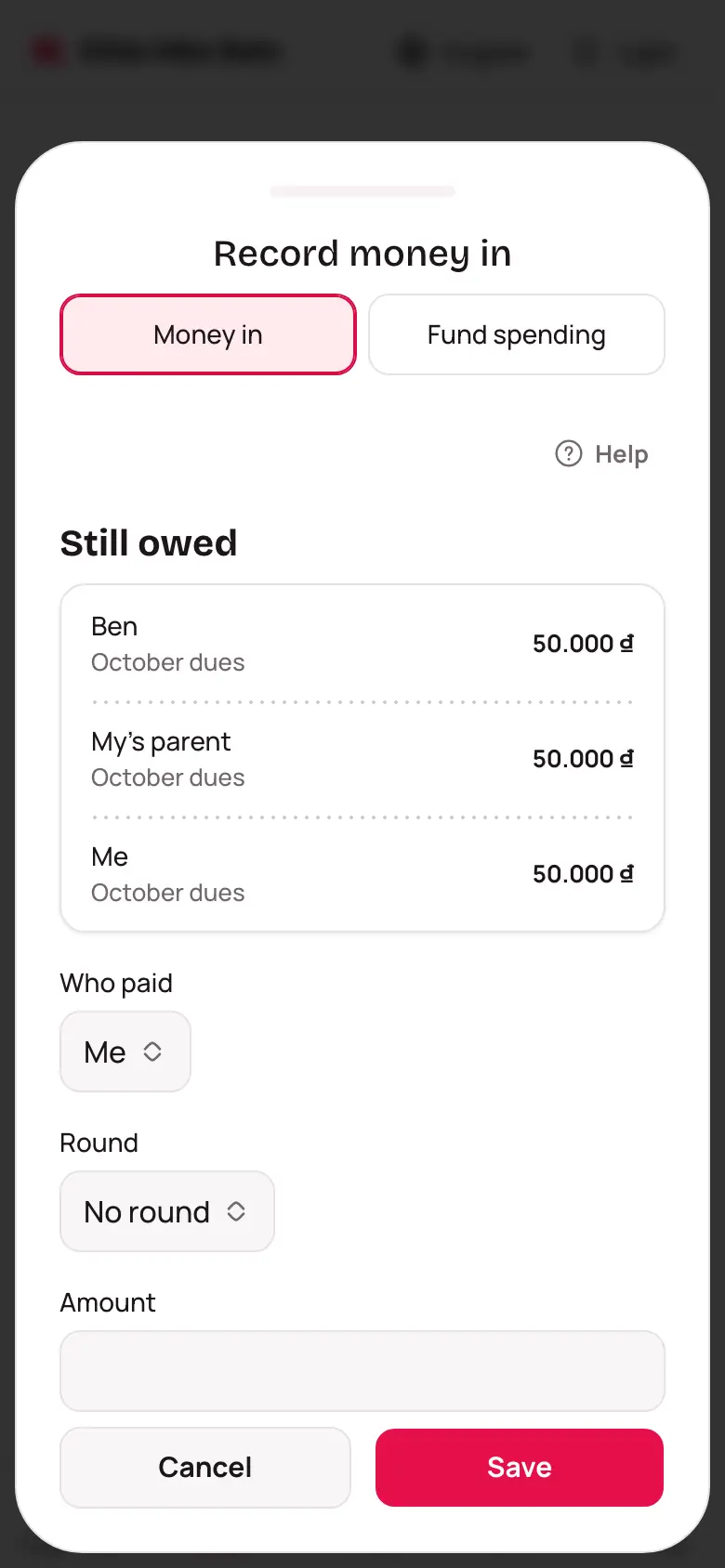
- Open the fund, go to the Money tab, tap Record money.
- Choose Money in.
- Under Still owed, tap the card for whoever paid — the app fills in the Round and Amount with what they still owed. Not shown? Type to search, or pick Who paid by hand.
- Change Who received it if the money isn't with you.
- Tap Save.
Overpaying, or paying outside a round
Recording more than what's still owed: choose Split (the default) or Record the full amount (overpay). For an entry outside a round, or overpaid, whose payer still owes elsewhere: open it, tap Use to cover a round… — only the extra moves.
Recording fund spending
Choose Fund spending instead of Money in, type What it was for (like a ball or printing), an amount and who spent it. Fund spending isn't split among anyone — unlike an expense in Shared expenses.
Editing or undoing an entry
Open the entry from the Money tab, tap Edit to change who paid or the round (money in), what it was for (fund spending), or the amount, date and who's holding it (either), or tap Undo to drop it from the balance — it can be restored later.
What Still owing, Paid in full, Exempt and Overpaid mean
The app compares what someone has paid in a round with what they owe: Still owing is not enough yet, Paid in full is exactly enough, Overpaid is more, Exempt means what's due is 0. The fund balance is every payment in minus every fund expense.